Built into the platform
TetherX AI
Traditional motion detection tells you something moved. TetherX AI tells you what moved. Video AI identifies people, vehicles and animals. Audio AI classifies 63 security-relevant sounds. Describe the footage you need in ordinary language, review the proposed filters and search across your sites.
Detect on-site, search across sites - video and audio analytics run on suitable TetherBox hardware. Natural language search uses cloud interpretation of your request and permitted locations.
On-Device Detection
An AI-capable TetherBox handles video and audio detection locally, alongside recording, without a separate analytics server.
Search in Your Own Words
Describe a person, vehicle, place or time. Review the proposed event filters and adjust the dates before opening the results.
Two Senses
Video AI and audio AI run together on the same TetherBox - audio covers the corridors and spaces a camera cannot see.
Search Within Your Access
Search interpretation receives your request and authorised location names, not footage. Results respect your site, camera and footage-access permissions.
We Taught TetherBoxes to See
Not just detect motion - actually understand what is in the frame. Video AI identifies people, vehicles and animals in real time, tracks their movement across the scene, and classifies what it finds. Draw a line on any camera and it counts the people, vehicles and animals crossing it, with a counts page, chart and export.
Detection That Holds Up in the Real World
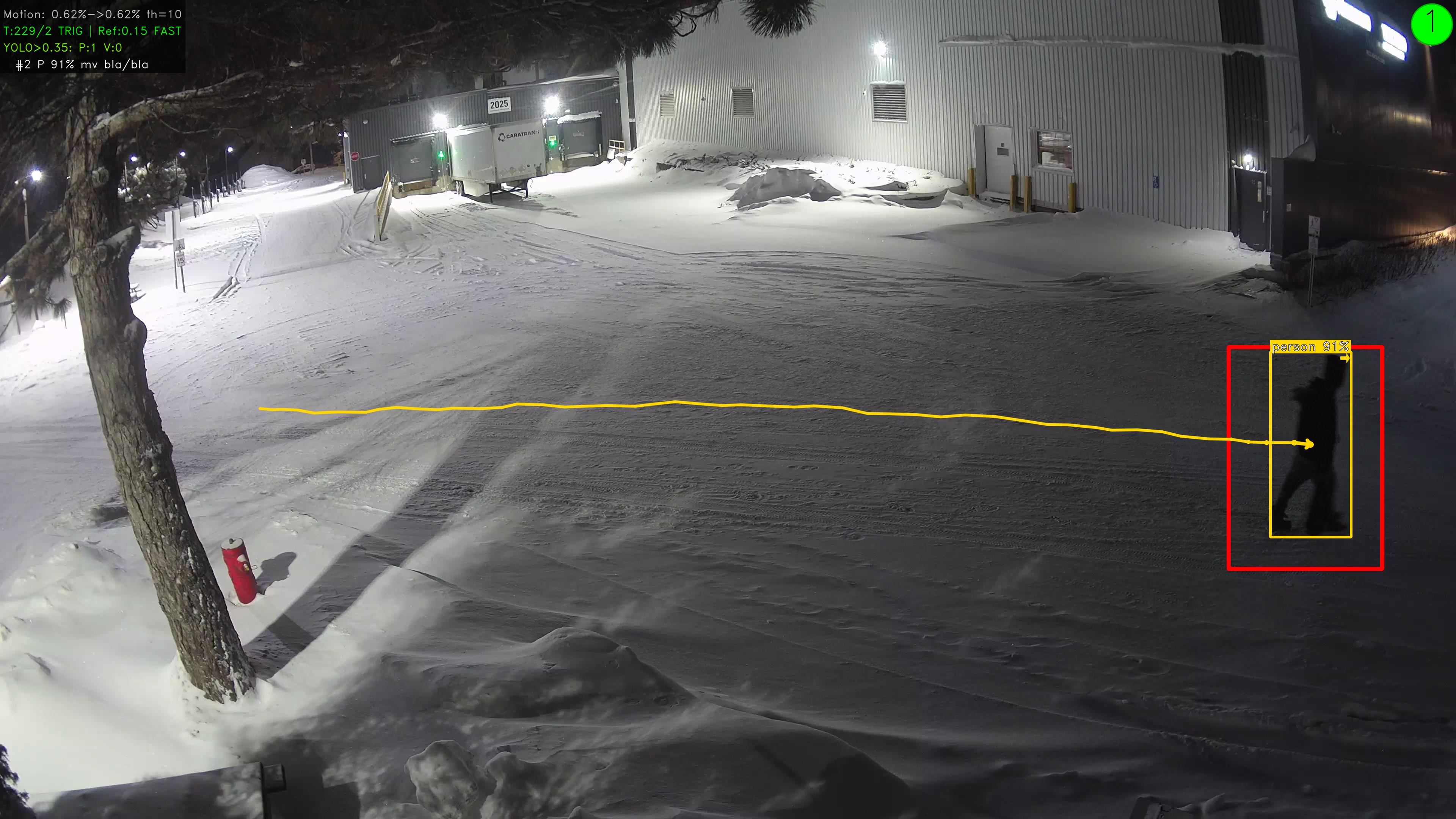
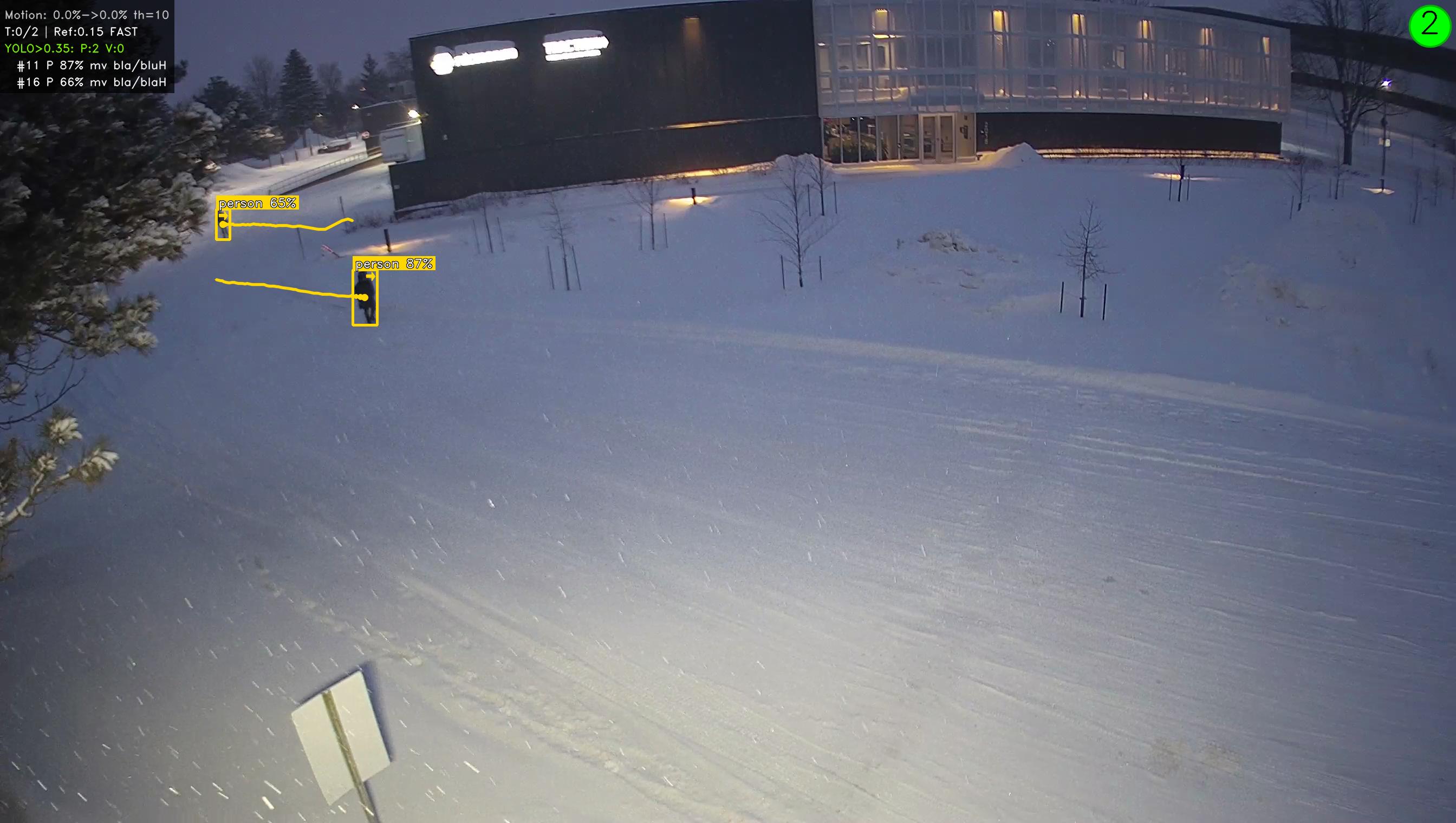
The images here are from a live site in Canada - night time, snow on the ground, well below zero. Two people detected at distance as tiny figures in a wide scene, at high confidence. Most camera analytics would not register them at all.
Each detection is tracked frame to frame, so you see the full trajectory: where someone came from, the path they took, and where they went.
People Counting at a Glance
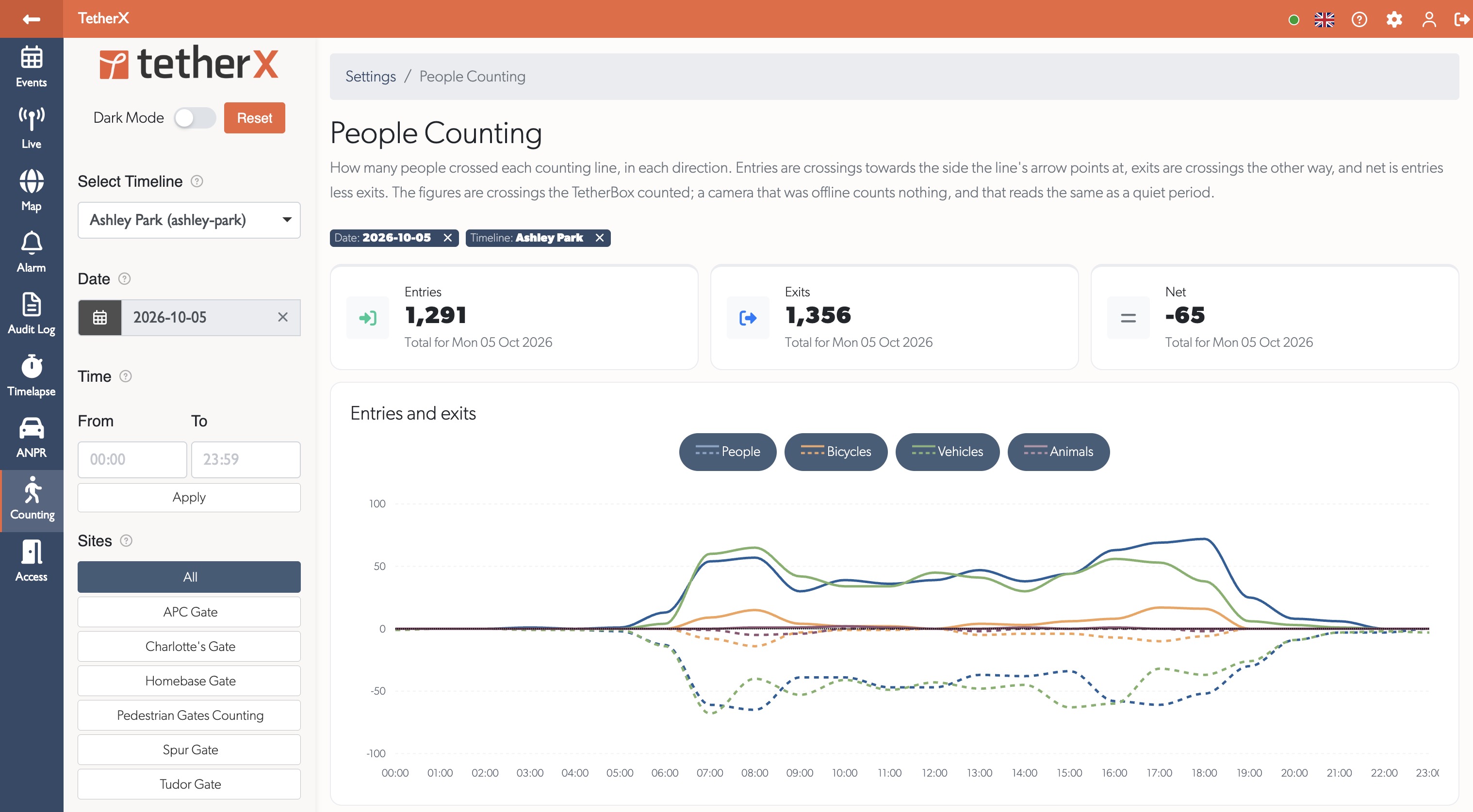
The people counting view shows entries, exits and net movement for the selected period, with a chart of crossings throughout the day.
Describe the Footage You Need
Open Find footage, type a description and review the filters before searching. Change the date range in the preview, then apply the search to your events.
- “Show me a person wearing a red hat last Tuesday.” Combines a person detection, hat colour and date.
- “Vehicles at all front doors at night.” Matches permitted front-door cameras and the overnight time window.
- “Line crossing events in June, mornings only.” Searches the whole month with a separate daily time window.
Person, Vehicle or Animal
Narrow results to the detection type you care about.
Clothing and Hat Colour
Search recorded top, bottom and hat colours, including a person wearing a red hat.
Vehicle and Animal Colour
Narrow recorded detections by colour across your permitted sites and cameras.
Moving or Stationary
Filter out parked vehicles, or focus on loitering.
Location and Time
Combine permitted sites and cameras with calendar ranges and daily time windows.
Recorded Analytics
Ask for supported detections such as line crossing, intrusion or parking.
Filter for a person in red, 6pm to midnight - results across every camera in seconds.
We Taught TetherBoxes to Hear
Video analytics have a blind spot - they only work where the camera can see. Audio AI classifies 63 distinct sounds across 7 categories, running continuously as a second sensory layer.
Detecting What Cameras Miss
Glass breaking behind a wall, a smoke alarm in an adjacent room, someone screaming off-screen - none of these trigger video analytics. A site with 16 cameras still has corridors, stairwells and spaces with no visual coverage.
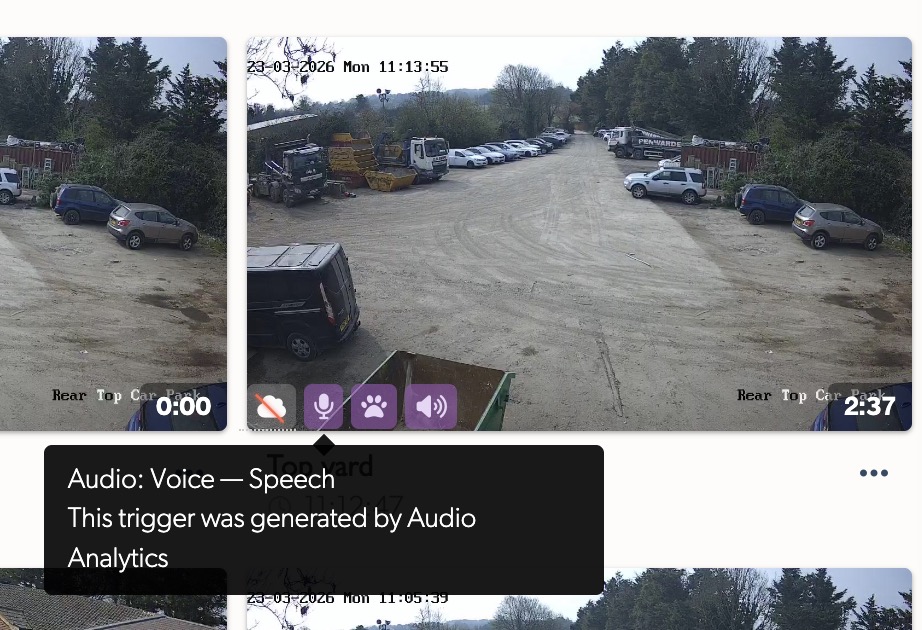
Audio events appear with distinctive purple icons on event thumbnails, instantly distinguishable from video detections when an operator is scanning dozens of events. Loud sounds above 99 dB SPL are automatically flagged regardless of classification.
Filter by category or individual sound class, and route notifications by type - glass break alerts to the monitoring station, dog barking to the site manager.
Seven Categories, 63 Sound Classes
Emergency
Screams, cries for help, shouting
Alarms
Smoke detectors, fire alarms, security sirens
Intrusion
Glass breaking, door forced, wood splintering
Vehicles
Engine start, horn, tyre screech, reversing beeper
Voice
Speech, arguing, crowd noise
Animals
Dog barking, bird of prey
Weather
Thunder, heavy rain, high wind
individual sound classes across every category
Two Sensors Create Context Neither Has Alone
A person detected on camera at 3am is interesting. A person detected at 3am with glass breaking on audio is an incident. Video AI and audio AI run on the same TetherBox, at the same time, with no extra hardware - each filling in what the other cannot reach.
More analytics through the year
Person, vehicle and animal detection, 63-class audio analytics and natural language footage search across sites. The platform keeps evolving with additional analytics through the year. The analytics below are shaped directly by integrator and customer requests. See the cloud / edge / camera analytics post for how we think about the analytics layer overall.
People Crowding
Flag when too many people gather in an area, for managing occupancy and spotting unusual build-ups.
Unattended Counter
Alert when a till or service point is left without staff for a set period of time.
Weapons Detection
Detect a range of weapons in the frame. Accuracy depends on camera placement and scene-specific training.
Face Recognition
Match faces against a known list, with a positive-match API for access and alerting workflows. In active development.
Need Something Specific?
Much of the roadmap comes straight from integrator requests. Tell us what your customers need.
Roadmap features and timing are indicative and may change.
Video and Audio Detection Stay On-Site
Video and audio detection run on an AI-capable TetherBox alongside recording, without uploading footage for those detections. Natural language search is a cloud service that interprets your request and authorised location catalogue; it needs an internet connection.
No Extra Server
Nothing to install and no separate box to maintain. It runs alongside normal recording.
Detect Without Uploading Video
Detection happens where the cameras are. Search requests use the connection to interpret your words and retrieve matching events.
Data Sovereignty
Video and audio detection stay on-site. Review cloud search, remote viewing and optional recording requirements alongside your data policy.
Cloud Backup Still Works
Optional cloud recording continues exactly as before, per camera.
What You Need
TetherX AI requires an AI-capable, recent-generation TetherBox. The box handles the video and audio workload locally, in real time, with no additional hardware and no change to how footage is recorded or backed up. If you are not sure whether a site's TetherBox is AI-capable, your TetherX account manager can confirm.
Full Details & Hardware RequirementsTetherX AI questions
No. Video and audio analytics run on the TetherBox itself, alongside normal recording. There is no separate AI server to provision, license or maintain.
Yes. Open Find footage and describe what you need, such as a person wearing a red hat last Tuesday. TetherX proposes the locations, dates, daily time window, detections and appearance filters. Review the preview, adjust the dates if needed and apply the search across your sites.
Video and audio detection run locally on suitable TetherBox hardware without uploading footage for classification. Natural language search sends your request and authorised location catalogue to a cloud interpreter, not the video. Remote viewing retrieves the clips you open, and optional cloud backup uploads footage for cameras you select.
The TetherX platform subscription is from £100/site/year. Your local integrator scopes suitable hardware and any specialist analytics or monitoring services for the site. Request a quote for your camera estate and the workflows you need.
The AI runs on the TetherBox, not in the camera. Any ONVIF camera and the 1,000+ integrations TetherX supports natively can feed TetherX AI - no swap-outs and no AI-specific camera SKU required. Recent-generation TetherBox hardware is required for the AI workload itself.
Cloud video analytics sends imagery to a remote service for classification. TetherX video and audio detection run on suitable TetherBox hardware. Natural language footage search uses the cloud to turn your description into search filters you can review before applying. Read our cloud / edge / camera analytics breakdown for the full trade-off.
We reply within 1 business day from a real engineer, not an SDR. Quote requests are routed to a local TetherX-certified integrator who handles the install and ongoing support.
Compare TetherX, honestly, to the alternatives.
Side-by-side pages against every cloud VMS, on-prem incumbent and manufacturer-bundled VMS integrators ask about - built from primary-source pricing, integrator forum quotes and current product documentation.
See all comparisonsDrowning in motion alerts that turn out to be a fox or a flag?
AI that tells the difference - and lets you filter every site for a person in red in seconds.
Request a quote and a TetherX integrator scopes AI for your sites.
Try TetherX AI on real sites
Video and audio AI run as an optional per-camera service on TetherX. Request a quote and we route you to a local TetherX integrator who will scope it on your sites.
We reply by email - usually within one business day.

Match me with a partner
Before you go - see TetherX AI on a real site near you.
Drop your work email and we will match you to an accredited local integrator running AI today.
No sales call; your email stays with us.