A Cloud App and CCTV for the Texecom Panels You Fit
Keep installing Texecom Premier and Elite and bring them into the cloud. TetherX wires the panel into the same VMS that runs your CCTV over a single USB-COM cable - real-time zone status, remote arm and disarm, a virtual keypad on web and mobile, per-zone bypass, and the matching camera footage attached to every alarm event. Channel-only, no rip-and-replace, recurring margin on work you already win.
- A virtual Texecom keypad on web and mobile - arm, disarm, bypass
- Camera footage attached to every alarm event for instant verification
- Channel-only - we never sell direct, the account stays yours
The Deepest Texecom Integration, In One Cloud VMS
Serial gives more than event notifications. TetherX gets live zone status, remote control and a real virtual keypad - beside the cameras, on every device.
Virtual Keypad, Every Device
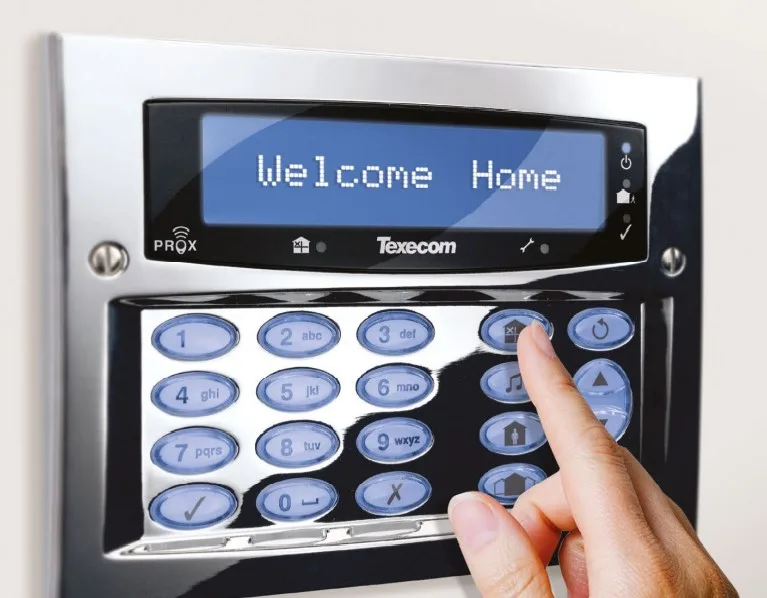
Texecom Premier and Elite show up with a virtual keypad that behaves like the metal one on the wall - full set, part set, area select, individual zone bypass, log review and output control. Arm a site from a phone before you leave; no panel-side app, no second login.
Visual Alarm Verification
Link cameras to alarm zones. When a zone trips, the operator gets a push alert with the matching camera image attached and one tap to live and recorded video. False alarms dismissed without a callout; genuine activations escalate immediately with footage in hand.
Remote Bypass & Centralised Sites
Bypass a malfunctioning zone remotely without disarming the whole site, and manage every Texecom site from one platform regardless of location. Replace a folder of manufacturer apps with one unified cloud VMS - the same one watching the cameras.
Try TetherX on Your Next Texecom Job
Add cloud control and CCTV on a 30-day trial. 1,000+ integrations, 15 min setup, no rip-and-replace.
- Cameras, alarms and access on one cloud VMS
- Live the same day - no rip-and-replace
- Reply within 1 business day, real engineers
Start My Free Trial
Name and email - we reply within 1 business day.
Your Alarm Panel Should Not Need Its Own App
Video and intrusion grew up as separate trades. The panel reports to a monitoring centre on one screen; the cameras live in another app. TetherX puts the Texecom panel and the CCTV in the same cloud VMS, so verification is one tap instead of two logins and a phone call.
Recurring Margin
Every Texecom site you have installed becomes a recurring cloud VMS line. Billed per channel, quoted through you.
No Rip-and-Replace
One USB-COM cable into COM2. Keep the panel, the wiring and the cameras - TetherX layers on top.
Verify in One Tap
The alarm event arrives with the camera image already attached. Dismiss false alarms without a callout.
We Never Sell Around You
TetherX is sold only through authorised installers and distributors. The end customer comes to us and we match them back to you.

A Real Virtual Keypad, In the Browser
Full set, part set, area select, individual zone bypass, log review and output control. One keypad, whether an operator opens it in the control room or a keyholder opens it on a phone. The panel's states are under the display. Its PC-controlled outputs are switches beside it.

Every Signal From One Incident, Together
A panel sends a panic, then a tamper on the same zone, then a restore. Each one is a separate SIA message. TetherX attaches all three to one event, in the order the panel sent them. Every row carries the exact string. Red marks a raised condition, green a cleared one, so the operator reads the incident beside the footage.

Point a Panel Zone at the Camera That Watches It
Map panel zone 1001 to the till camera. A panic on that zone opens on the till footage, with the recording and the thumbnail on it. Name the doorway and the yard as Related Zones for that camera, and their footage is marked as part of the same panic. The badge above the table is what the panel last reported, and it clears when the restore arrives.
What You Need to Connect Texecom
A standard Texecom install plus one serial cable. No panel swap, no firmware change.
USB-COM Cable (JAC-0001)
Texecom USB-COM Interface Connector from COM2 on the panel to a free USB port on the TetherBox.
TetherBox On Site
A TetherBox with a spare USB port - local-first recording for the cameras, cloud reach for the panel.
Configure in Wintex
Set COM2 to 19200 baud, enable the communicator and set the UDL passcode. A five-minute job in Wintex.
Link Cameras to Zones
Assign any ONVIF camera to an alarm zone for automatic footage on every activation.
Supports Texecom Veritas, Premier and Elite over serial. Got an IP communicator instead? TetherX receives SIA DC-09 and Contact ID directly, groups every signal from one incident onto a single event, and records whether the panel is reachable. Texecom SmartCom is not currently supported.
The cameras and the Texecom panel should live in the same cloud VMS.
Keep the Texecom panels you trust. Add a cloud app, remote arm and disarm, virtual keypad, video verification - and a recurring revenue line - without swapping a single panel.
Channel-only. Add a cloud app and CCTV to the Texecom panels you fit.
Running Texecom at Your Own Site?
Tell us about your panel and cameras and we'll match you to a certified TetherX installer in your area who can scope the Texecom cloud integration. No obligation, no pushy sales.

